
Cisco Monitoring
Temperature, fans, power supply, memory, CPU and interfaces of Cisco devices under control, with traffic thresholds customisable port by port.
Network devices always monitored
Cisco is a leader in the enterprise networking market and offers many types of network devices, such as routers, switches and firewalls. These devices underpin the company’s service levels, which is why they need to be monitored constantly.
The Sentinet³ Cisco Pattern puts the parameters essential to the operation of any Cisco device under monitoring in a few steps and, thanks to the notification system, makes it possible to act promptly.
| At a glance | |
|---|---|
| Pattern | Sentinet³ Cisco Pattern |
| Devices | Cisco routers, switches and other network devices |
| Scope | Device status, network interfaces |
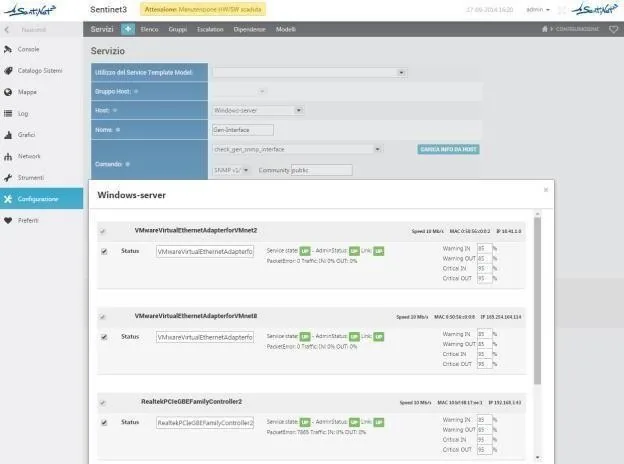
The Pattern’s checks
Every check has operator-configurable thresholds and sends notifications when values exceed them.
The device
| Check | What it verifies |
|---|---|
| Reachability | The network device responds |
| Temperature | Device temperature |
| Fans | Fan operation |
| Power | Power supply |
| Mem | Percentage of memory in use |
| CPU | Percentage of CPU in use |
The network (for each interface)
A single query to the router or switch returns this information for each interface.
| Check | What it verifies |
|---|---|
| Status | Interface status, up or down |
| IP address | IP address of the network interface |
| MAC | MAC address of the interface |
| Speed | Interface speed, in Mbit |
| Packet Error | Number of packets with errors |
| Traffic | Inbound and outbound traffic |
Anticipate risk, act in time
- Risk forecasting: it is the first factor that shapes the action plans against device malfunctions.
- Per-interface thresholds: warning and critical values for inbound and outbound traffic are set for each interface.
- Only the interfaces you need: you choose which and how many interfaces to monitor and give each one a custom name.
- Guided configuration: a wizard guides the user through customising the monitoring parameters.
Related topics
Want to see Sentinet³ on your infrastructure?
Tell us about your environment: sites, technologies, critical services. We will show you how Core and Infinity can work on your case.